A Turn to Learn

Ed Tech Integration in the Elementary Classroom

  • Technology Tutorials
    • Chromebooks
    • PowerPoint
    • Photo Editing
  • Teacher Tips
    • Classroom Organization
    • Classroom Management
    • Techie Tricks
  • Classroom Activities
    • Smartboard Games
    • Teachers Pay Teachers
  • About Me

Increase Your Text One Size!

11.01.2012 by Jessica Kings //

Do you ever want to get your text to fit absolutely perfect in a given area?  If so, this tip is perfect for you!  It works in Word, PowerPoint, and Publisher. 
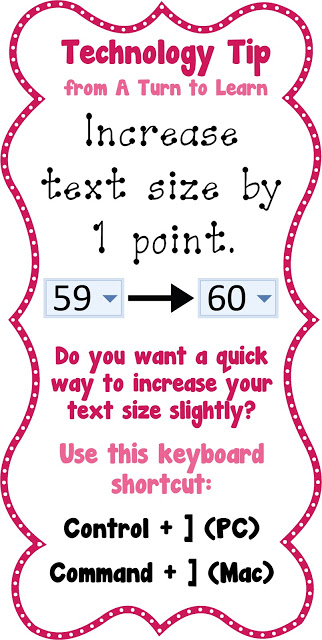
Try it out and let me know how you like it!

Share this:

  • Facebook
  • Pinterest
  • Twitter
  • Email

Categories // Keyboard Shortcuts

Connect

  • Bloglovin
  • Facebook
  • Pinterest
  • YouTube

Search

Categories

Products

Certifications


Tynker Blue Ribbon Educator

Nearpod Certified Educator

Certified Brain Pop Educator

Try This Tutorial

Chromebook Help - Fix a Gigantic Mouse

Help! Fix My Chromebook… My Mouse is Gigantic!

Try This Activity

Chromebook Help - Fix Video Pop Ups in Chrome

Help! Fix My Chromebook… I’m Getting Video Pop Ups!

Popular Posts

  • How to Have Both Portrait and Landscape Slides in One PowerPoint! (-ish!)
    How to Have Both Portrait and Landscape Slides in One PowerPoint! (-ish!)
  • How to Make Clipart From Your Own Drawings!
    How to Make Clipart From Your Own Drawings!
  • How to Print on Sentence Strips
    How to Print on Sentence Strips
  • PBS Kids Play Review
    PBS Kids Play Review
  • How to Make Easy Page Borders in Microsoft Word!
    How to Make Easy Page Borders in Microsoft Word!

Copyright © 2026 · Modern Studio Pro on Genesis Framework · WordPress