A Turn to Learn

Ed Tech Integration in the Elementary Classroom

  • Technology Tutorials
    • Chromebooks
    • PowerPoint
    • Photo Editing
  • Teacher Tips
    • Classroom Organization
    • Classroom Management
    • Techie Tricks
  • Classroom Activities
    • Smartboard Games
    • Teachers Pay Teachers
  • About Me

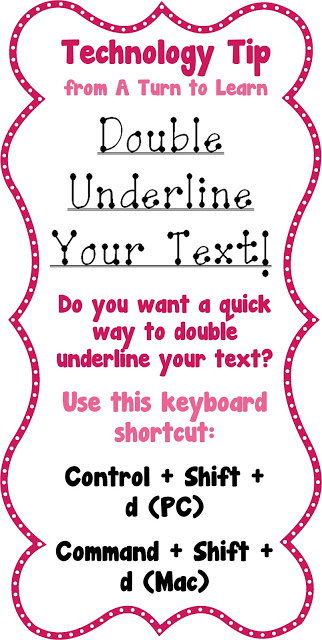
Double Underline Your Text!

12.20.2012 by Jessica Kings //

Here’s another little nifty keyboard shortcut to make your technology experience a little easier!

This is another tip that seems to work primarily in Microsoft Word, but I really do wish it worked in other programs!
Share this:

  • Facebook
  • Pinterest
  • Twitter
  • Email

Categories // Keyboard Shortcuts

Connect

  • Bloglovin
  • Facebook
  • Pinterest
  • YouTube

Search

Categories

Products

Certifications


Tynker Blue Ribbon Educator

Nearpod Certified Educator

Certified Brain Pop Educator

Try This Tutorial

Chromebook Help - Fix a Gigantic Mouse

Help! Fix My Chromebook… My Mouse is Gigantic!

Try This Activity

Chromebook Help - Fix Video Pop Ups in Chrome

Help! Fix My Chromebook… I’m Getting Video Pop Ups!

Popular Posts

  • How to Make a 4" x 6" Document in PowerPoint
    How to Make a 4" x 6" Document in PowerPoint
  • How to See What Your Most Popular Blog Posts Are
    How to See What Your Most Popular Blog Posts Are
  • How to Copy HTML/Embed Code to Your Blog!
    How to Copy HTML/Embed Code to Your Blog!
  • Show Off Your Classroom!
    Show Off Your Classroom!
  • How to Make Primary Writing Lines
    How to Make Primary Writing Lines

Copyright © 2026 · Modern Studio Pro on Genesis Framework · WordPress